Note: All troubleshooting steps below assume that your Themis Mini Scale is running the latest firmware. If it is not, please refer to this article to update your firmware to the latest version before proceeding.
1. Transparent protective strip not removed
First-time use may be affected if the clear plastic transport protectors around the weighing surface are still attached.
Solution: Remove the protective strip. Leaving it on can reduce sensor sensitivity and cause unstable readings.
2. Environmental factors
Placing the scale on a non-level surface or near airflow (fans, air conditioners) can affect readings and may prevent the scale from starting properly.
Solution: Place the scale on a level, stable surface and away from direct airflow.
3. Loose internal screw
A sharp external impact may loosen a screw inside the scale, which can touch the sensor and affect readings.
How to check: Gently shake the scale. If you hear a rattling sound, it indicates a loose screw touching the sensor.
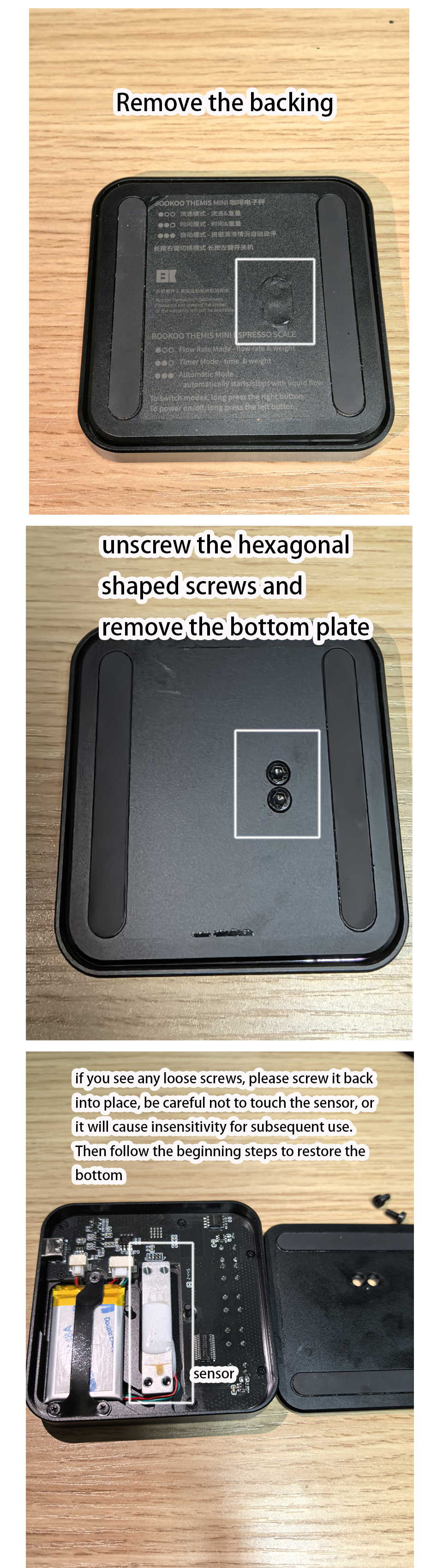
Solution:
1. Peel off the adhesive pad underneath the scale.
2. Use a hex wrench to remove the hex screws and take off the bottom cover.
3. Tighten any loose screws carefully, avoiding contact with the sensor.
4. Reassemble the bottom cover.
Note: Providing a short video or photo helps support diagnose issues faster.
4. Scale not calibrated
Uncalibrated scales can cause drifting readings or unusual values, such as negative weight readings or inconsistent measurements.
Solution: Refer to our Themis Mini Weight Calibration Guide for detailed calibration instructions.
Tip: Even though the scale is calibrated at the factory, performing a fresh calibration can help resolve drifting or inconsistent readings. Make sure the scale is placed on a level and stable surface before calibration.
5. Interference during extraction
Touching the scale or placing objects on it during extraction can cause fluctuations in both weight and flow rate readings.
Solution: Avoid touching the scale while brewing.
6. Sensor failure
If all previous troubleshooting steps have been completed and the scale still shows unstable readings, the sensor may be defective.
Solution: Please refer to our Replacement Guide to request a replacement.
If you have any further questions or need additional help, feel free to send us a message — we are here to assist you.